Caregiver Status
The Caregiver Status is the determining factor when scheduling a Caregiver to provide service. Use the Caregiver Status function to track employment status in the system to ensure that only authorized, available Caregivers are scheduled.
|
Status |
Description |
|
Active |
Caregiver is authorized and available to provide service. Caregivers listed as Active may be scheduled for visits. |
|
Inactive |
Status categories include Inactive, Hold, On Leave, and Terminated. These status categories are assigned as applicable and at the Agency’s discretion. A Caregiver with any of these statuses cannot be scheduled for visits. |
Follow the steps outlined below to change a Caregiver Status in the system.
|
Step |
Action |
|---|---|
|
1 |
Navigate to Caregiver > Caregiver Search. |
|
2 |
Select the Profile link from the Index. On the Profile page, click Edit. |
|
3 |
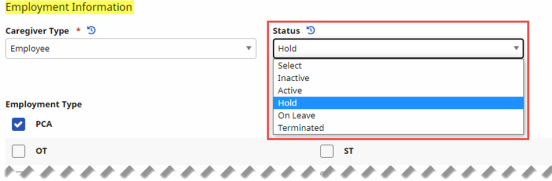
Scroll to the Employment Info section. Select the applicable status from the Status field (as illustrated in the image).
Changing Caregiver Status |
|
Step |
Action |
|---|---|
|
4 |
(Optional) To provide a complete record for the Employment Status change, select a Status Change Reason (setup using the Caregiver Status Reason Reference Table) and enter a Status Change Notes when changing a Caregiver’s Status.
Status Change Reason and Status Change Notes |
|
5 |
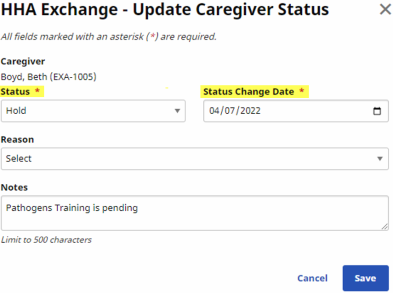
(Optional) In the Scheduled Status Changes grid, click the Add button to schedule the Status change and complete the required fields.
Scheduled Status Changes: Add Button
Update Caregiver Status: Status and Status Change Date Fields
Schedule Status Change |
|
6 |
Click the Save button to finalize. |