View Shift History
To view the history of a shift, click the ellipsis (…) under the Actions column for the shift, and select View Shift History.
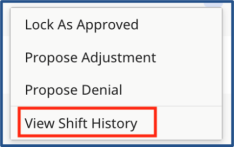
Actions: View Shift History
The Shift History opens displaying information including shift details, status changes, and notes. When you are finished reviewing history, click Close.
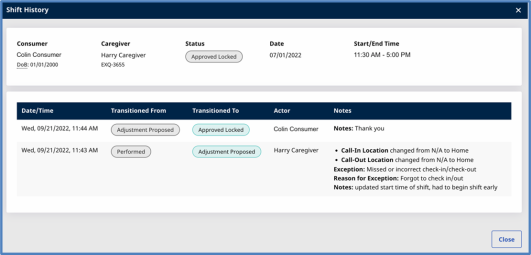
Shift History page
| Field |
Description |
|
Consumer |
Name of the Consumer who received services. |
|
Caregiver |
Name of the Caregiver who provided services. |
|
Status |
Status of the shift. See Shift Status in Search Shifts for details. |
|
Start/End Time |
Start and end time of the shift. |
|
Date/Time |
Date and time that the action occurred. |
|
Transitioned From |
Status of the shift before the action occurred. |
|
Transitioned To |
Status of the shift after the action occurred. |
|
Actor |
Person who performed the action. |
|
Notes |
Information about the shift, including changes, reasons for changes, and notes left by the person who made the changes or performed the action. |